
RabbitMQ Architecture Demystified: Exchanges, Queues, and Bindings Explained for Cloud Engineers
RabbitMQ is one of the most widely deployed message brokers in cloud-based microservices architectures, yet the relationship between its three core routing components (exchanges, queues, and bindings) trips up engineers at every experience level. This guide walks through each component clearly, traces a real message from producer to consumer, and gives you a decision framework for choosing the right exchange type for your core RabbitMQ architecture.
Quick Answer: How Does RabbitMQ Route Messages?
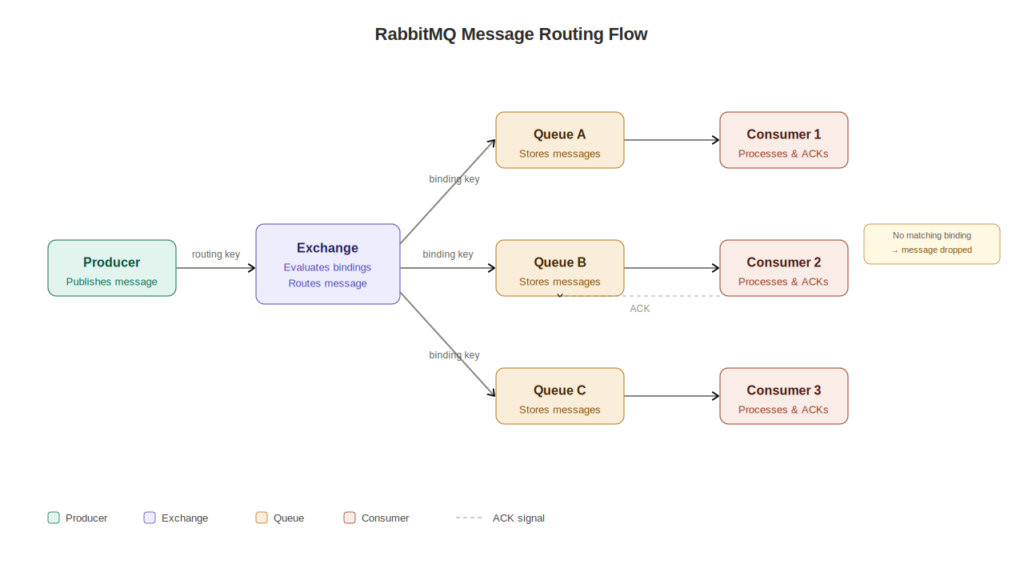
RabbitMQ exchanges queues and bindings form a three-part routing pipeline. A producer publishes a message to an exchange, which evaluates configured bindings to determine which queues should receive that message. The queue stores the message until a consumer retrieves and acknowledges it. Exchanges handle routing logic, bindings define the routing rules, and queues hold the data. No component bypasses this sequence.
What RabbitMQ Does in a Cloud Architecture
A message broker is software that receives messages from one service and delivers them to another, decoupling the sender from the receiver. RabbitMQ is a message broker that implements the AMQP 0-9-1 protocol (Advanced Message Queuing Protocol), an open standard for message-oriented middleware. You can run RabbitMQ on AWS via Amazon MQ, on Azure through CloudAMQP, on Google Cloud, or self-hosted on Kubernetes.
Why does decoupling matter for your cloud architecture? When Service A calls Service B directly over HTTP, a failure in Service B breaks Service A. With RabbitMQ in between, Service A publishes a message and moves on. Service B processes that message whenever it’s ready. Services can scale, restart, or update independently without breaking the communication chain between them.
This publish-subscribe pattern also improves throughput. Rather than waiting for downstream services to respond synchronously, your producer services keep running at full speed. The message broker absorbs the load difference between fast producers and slower consumers.
The Core Components of RabbitMQ Architecture
Understanding how RabbitMQ works starts with knowing what each component does and where it sits in the message flow. There are five primary entities you’ll work with in any deployment.
The Five Entities in Every Message Flow
- Producer: The application or service that creates and publishes messages to an exchange.
- Exchange: The routing component that receives messages from producers and forwards them to queues based on configured rules.
- Binding: A configured relationship between an exchange and a queue that tells the exchange which queues should receive which messages.
- Queue: An ordered buffer that stores messages until a consumer retrieves and processes them.
- Consumer: The application or service that reads messages from a queue and processes them.
There’s also the virtual host (vhost), which acts as a logical namespace inside a RabbitMQ broker. Vhosts isolate exchanges, queues, and bindings from each other, making them useful for separating environments (staging vs. production) or tenants on shared infrastructure.
The Sequence That Matters
The flow always runs in one direction: producer publishes to exchange, exchange evaluates bindings, message lands in matched queues, consumer reads from queue. Producers never write directly to queues. This is one of the most common misconceptions engineers carry into their first RabbitMQ deployment, and it causes real configuration errors when they try to skip the exchange layer.
Exchanges: Where Message Routing Decisions Are Made
A RabbitMQ exchange is the component that receives messages from producers and decides which queues to forward them to, based on the exchange type and the bindings configured against it. Exchanges do not store messages. If a message arrives at an exchange with no matching binding, it gets dropped or returned to the producer depending on the message’s mandatory flag. This is why binding configuration is so operationally important.
RabbitMQ Exchange Types: A Quick Overview
- Direct Exchange: Routes messages to queues whose binding key exactly matches the message’s routing key.
- Fanout Exchange: Routes messages to all queues bound to it, ignoring the routing key entirely.
- Topic Exchange: Routes messages to queues based on wildcard pattern matching against the routing key.
- Headers Exchange: Routes messages based on message header attributes rather than the routing key.
The table below compares all four RabbitMQ exchange types to help you choose the right one for your cloud architecture.
| Exchange Type | Routing Logic | Routing Key Required | Best Use Case | Cloud Scenario |
|---|---|---|---|---|
| Direct | Exact key match | Yes | Task distribution, job queues | Route payment events to a billing service |
| Fanout | Broadcast to all bound queues | No | Notifications, cache invalidation | Notify all services when a user updates their profile |
| Topic | Wildcard pattern match | Yes (dot-separated) | Event routing by domain and type | Route order.* events to fulfillment, #.error to logging |
| Headers | Header attribute matching | No | Complex conditional routing | Route messages by region or content-type header |
How Topic Exchange Wildcards Work
Topic exchanges use dot-separated routing keys like order.placed or payment.failed.us-east. Two wildcard characters control pattern matching in binding keys. The * character matches exactly one word in a position. The # character matches zero or more words. A binding key of order.* matches order.placed and order.cancelled but not order.placed.express. A binding key of order.# matches all three.
This wildcard behavior makes topic exchanges the most flexible option for microservices architectures where event types evolve over time. You can add new event subtypes without reconfiguring existing consumers.
Hands-On Tip: Run a local RabbitMQ instance using Docker with docker run -d --hostname rabbit --name rabbitmq -p 5672:5672 -p 15672:15672 rabbitmq:3-management to follow along with exchange and binding examples in your own environment. The management UI runs at localhost:15672.
Bindings: The Rules That Connect Exchanges to Queues
A RabbitMQ binding is a configured relationship between an exchange and a queue that tells the exchange which queues should receive which messages. Bindings are created explicitly by your application code or infrastructure configuration. They do not form automatically when a queue and exchange exist in the same vhost.
How Binding Keys Work
When you create a binding, you specify a binding key. For direct and topic exchanges, the binding key is compared against the message’s routing key to determine whether the message gets forwarded to that queue. For fanout exchanges, the binding key is ignored entirely. For headers exchanges, matching is done against message header attributes rather than any key.
A single queue can have multiple bindings from the same exchange or from different exchanges. A single exchange can have bindings to many queues. This many-to-many relationship is what makes RabbitMQ’s routing model flexible enough to handle complex microservices communication patterns.
Why Missing Bindings Cause Silent Message Loss
Misconfigured or missing bindings are one of the most common causes of silent message loss in production RabbitMQ deployments. When a message arrives at an exchange with no matching binding, it disappears without error by default. Your producer gets no failure signal. Your consumer never sees the message. The system appears healthy while data is being dropped.
The RabbitMQ Management UI gives you visibility into this. After configuring your exchanges and bindings, check the Exchanges tab to inspect which queues each exchange routes to. Any exchange showing zero bindings for messages you expect to route is a configuration problem waiting to surface in production.
Queues: Where Messages Wait for Processing
A RabbitMQ queue is an ordered buffer that stores messages until a consumer retrieves and processes them. Queues are the only component in RabbitMQ that actually holds messages. Exchanges and bindings are purely routing infrastructure with no storage capability.
Queue Properties That Affect Cloud Reliability
Queue behavior is controlled by properties set at declaration time. Changing properties on an existing queue requires deleting and recreating it, which means getting these settings right before production matters.
- Durable: A durable queue survives a broker restart. Non-durable queues are deleted when the broker restarts. For any transactional workload, choose durable.
- Exclusive: An exclusive queue is tied to a single connection and deleted when that connection closes. Useful for temporary reply queues in request-reply patterns.
- Auto-delete: The queue deletes itself when the last consumer disconnects. Appropriate for temporary work queues but dangerous for persistent event streams.
- Message TTL: Sets a time-to-live for messages in the queue. Expired messages can be routed to a dead-letter exchange rather than simply dropped.
- Max length: Caps the number of messages the queue holds. When the limit is reached, older messages are dropped or dead-lettered depending on your overflow policy.
Queue memory usage deserves attention in cloud deployments. RabbitMQ will begin throttling publishers when memory consumption crosses a configured threshold, with 40% of available RAM as a common default trigger. Keeping queues bounded and monitoring queue depth prevents your broker from becoming a bottleneck. A queue length limit set to 30% of your expected peak volume gives you a safer baseline before messages start backing up into broker memory.
Message Acknowledgment and Durability
Consumer acknowledgment controls when RabbitMQ removes a message from the queue. With automatic acknowledgment, the message is removed as soon as it’s delivered. With manual acknowledgment, the consumer explicitly confirms processing, and RabbitMQ requeues the message if the consumer disconnects before acknowledging. For any workload where losing a message has a business cost, manual acknowledgment is the right choice.
Message persistence is separate from queue durability. A durable queue survives a restart, but messages published without the persistent flag are still stored in memory and can be lost on restart. Set both queue durability and message persistence to protect data across broker restarts.
A Complete RabbitMQ Message Flow: From Producer to Consumer
Consider an e-commerce platform where an order service publishes an order.placed event after a customer completes checkout. Two downstream services need to act on that event: a fulfillment service that triggers warehouse picking, and a notification service that sends the customer a confirmation email.
Tracing the Message Through the Architecture
- The order service (producer) publishes a message with routing key
order.placedto a topic exchange namedorders. - The
ordersexchange evaluates its bindings. Two bindings exist: one connecting the exchange to afulfillment.queuewith binding keyorder.*, and one connecting tonotification.queuewith binding keyorder.placed. - Both binding keys match the routing key
order.placed, so the exchange forwards a copy of the message to both queues. - The fulfillment service (consumer) reads from
fulfillment.queueand sends a warehouse pick request. It sends a manual acknowledgment when the pick request succeeds. - The notification service reads from
notification.queueand sends the confirmation email. It acknowledges after the email API call returns successfully.
If the notification service crashes mid-processing and never acknowledges, RabbitMQ requeues the message and redelivers it when the service reconnects. The fulfillment queue is unaffected. Each consumer operates independently against its own queue.
A dead-letter exchange adds another safety layer. Configure it on your queues to capture messages that expire, get rejected, or exceed the queue’s max length. Those messages route to a separate dead-letter queue where you can inspect, reprocess, or alert on them rather than losing them silently.
RabbitMQ vs. Kafka: Choosing the Right Tool
RabbitMQ and Kafka solve related but different problems. Choosing between them comes down to your primary communication pattern.
RabbitMQ is built for task distribution and request-reply patterns where individual messages need guaranteed delivery and flexible, per-message routing logic. Once a consumer acknowledges a message, RabbitMQ removes it. The broker doesn’t retain message history.
Kafka is built for high-throughput event streaming where message history and replay are more important than per-message routing control. Kafka retains messages for a configurable period regardless of consumer acknowledgment, making it the right choice for audit logs, event sourcing, and analytics pipelines.
For most cloud microservices architectures handling transactional workloads (order processing, job queues, notifications, payment events) RabbitMQ’s exchange-binding model gives you more granular routing control with lower operational complexity than Kafka. If your team is asking “did this specific message get processed?” rather than “what happened across all events in the last 30 days?”, RabbitMQ is the more direct answer.
Common RabbitMQ Architecture Mistakes and How to Avoid Them
The mistakes that cause the most operational pain in production RabbitMQ deployments aren’t complex. They’re the kind of configuration gaps that are easy to miss during initial setup and hard to diagnose after the fact.
Three Mistakes That Cost Engineers the Most Time
- Missing bindings causing silent message loss: An exchange with no matching binding drops messages without error. Always verify binding configuration in the Management UI before deploying to production. Name your exchanges, queues, and routing keys with a consistent convention (e.g.,
service.entity.action) so bindings are auditable by your whole team. - Non-durable queues losing data on restart: A broker restart in a cloud environment — triggered by an update, a node failure, or a scaling event — will delete every non-durable queue and all its messages. Declare queues as durable and publish messages with the persistent flag for any workload that can’t afford data loss.
- Unbounded queues exhausting broker memory: Without a max-length policy, a slow or offline consumer lets messages accumulate indefinitely. Set queue length limits and configure a dead-letter exchange to capture overflow messages rather than letting them pile up against your broker’s memory ceiling.
The dead-letter exchange pattern deserves its own mention as a standard production safeguard. Configure a dedicated dead-letter exchange and dead-letter queue on every production queue. When messages expire, get rejected, or overflow, they route to the dead-letter queue instead of disappearing. You can then inspect those messages, alert on unexpected dead-letter volume, and replay them after fixing the underlying issue.
Your RabbitMQ Architecture Decision Guide
Use this framework when you’re mapping a microservices communication pattern to an exchange type.
- Every consumer needs every message (broadcast): Use a Fanout exchange. No routing key needed. All bound queues receive every message.
- Each message goes to exactly one queue (task distribution): Use a Direct exchange with a specific routing key per queue.
- Messages need pattern-based routing across service domains: Use a Topic exchange with dot-separated routing keys and wildcard binding patterns.
- Routing depends on message content attributes, not event type: Use a Headers exchange and match on message header values.
When you’re unsure, start with a Topic exchange. Its wildcard routing covers most microservices patterns and gives you room to extend your routing logic as your architecture grows without redesigning your exchange topology.
Frequently Asked Questions About RabbitMQ Architecture
What is the difference between a RabbitMQ exchange and a queue?
An exchange receives messages from producers and routes them to queues based on bindings and routing rules. A queue stores messages until a consumer retrieves them. Exchanges contain no messages. Queues contain no routing logic. They serve completely different functions and both are required for message delivery.
What is a RabbitMQ binding?
A RabbitMQ binding is a configured link between an exchange and a queue. It tells the exchange which queues should receive messages and, for direct and topic exchanges, which routing key patterns qualify a message for that queue. Bindings must be created explicitly; they don’t form automatically.
When should I use a Topic exchange vs. a Direct exchange?
Use a Direct exchange when each message type maps to exactly one queue and routing is straightforward. Use a Topic exchange when you need one exchange to serve multiple consumer groups with different subscription patterns, or when your routing keys follow a hierarchical naming convention that benefits from wildcard matching.
What happens when a message reaches a RabbitMQ exchange with no binding?
The message is dropped by default. If the producer published with the mandatory flag set, RabbitMQ returns the message to the producer with a basic.return signal. Without the mandatory flag, the message disappears silently. This is why monitoring exchange-level message drop rates in the Management UI matters in production.
How do bindings connect exchanges to queues in RabbitMQ?
You create a binding by specifying the exchange name, the queue name, and a binding key. When a message arrives at the exchange, the exchange compares the message’s routing key against all binding keys for that exchange type’s matching rules. Every queue whose binding key matches receives a copy of the message.
Can a queue receive messages from multiple exchanges?
Yes. A single queue can have bindings from multiple exchanges. Each binding is evaluated independently. This lets you consolidate messages from different event sources into one consumer queue without changing the producer or exchange configuration.
What is a dead-letter exchange in RabbitMQ?
A dead-letter exchange is a regular exchange that receives messages when they’re rejected, expire due to TTL, or overflow a queue’s max-length limit. Configure it as a property on your queue at declaration time. It gives you a recovery path for failed or unprocessable messages instead of losing them permanently.